If you are still swapping tiny plastic SIM cards every time you travel or juggle two phones to manage work and personal numbers, there is a simpler way. Most newer phones support eSIM, and every major telecom provider in the UAE now lets you convert your physical SIM into an electronic one without charging you a dirham, provided you do it through their app.
The switch takes about five minutes, you can keep your existing number, and you never have to worry about losing that microscopic SIM tray tool again. Here is exactly how it works, what you need before you start, and how to activate it with etisalat, du, or Virgin Mobile
Related: How to Change Your UAE Visa Without Leaving the Country
UAE eSIM Guide
Why Bother Switching?
An eSIM is exactly what it sounds like: a SIM card that is embedded in your phone digitally rather than physically. Depending on your handset, you can store up to eight eSIM profiles at once, though only two can be active simultaneously.
That makes life easier in a few specific ways. If you travel regularly, you can add a local data plan abroad without removing your UAE number. If you run two lines, you can keep both on one device instead of carrying two phones. Etisalat also notes that eSIMs come with stronger authentication protocols, which adds a layer of security that physical cards do not offer.
What It Costs
A standard SIM replacement in the UAE typically costs around AED 25. However, all three major providers, etisalat, du, and Virgin Mobile, are currently waiving that fee for customers who switch to an eSIM through their official smartphone apps. In other words, if you have a compatible phone and ten minutes of patience, the conversion is free.
What You Need Before You Start
There are three non-negotiable requirements.
First, your phone must actually support eSIM. The easiest way to check is to open your phone settings, navigate to the network or cellular section, and look for an eSIM or add data plan option. If it is not there, your handset is not compatible.
Second, you need to be physically present in the UAE to request the switch. Providers will not process the conversion if you are abroad.
Third, you need UAE Pass installed and working on your device. Every provider uses it to verify your identity, and you will also need your Emirates ID handy for the digital document upload.
How to Activate with Etisalat
Open the etisalat app and log in using UAE Pass. Find your registered mobile number, tap the eSIM option, and select activate eSIM.
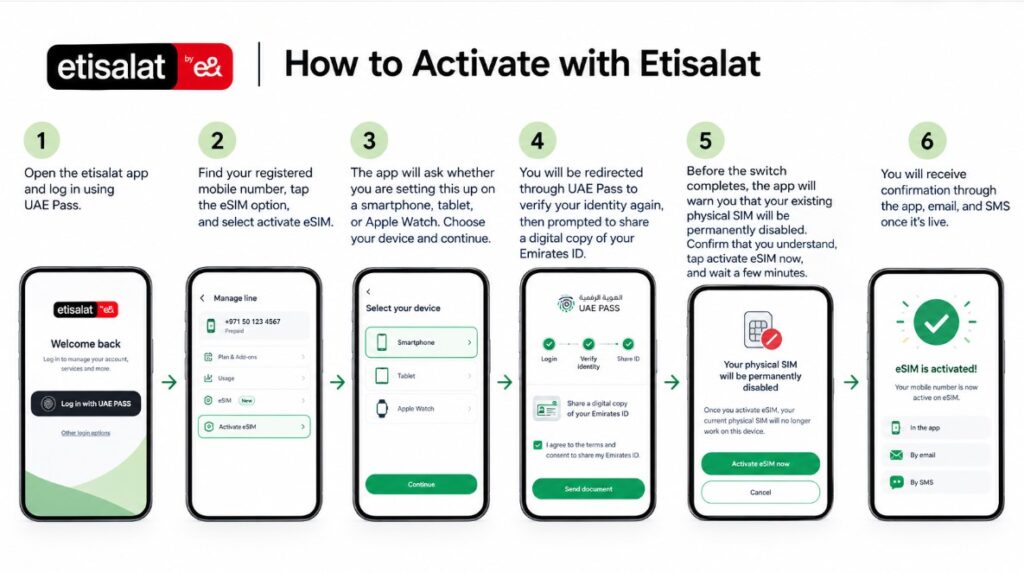
The app will ask whether you are setting this up on a smartphone, tablet, or Apple Watch. Choose your device and continue. You will be redirected through UAE Pass to verify your identity again, then prompted to share a digital copy of your Emirates ID. Tick the consent box and send the document.
Before the switch completes, the app will warn you that your existing physical SIM will be permanently disabled. Confirm that you understand, tap activate eSIM now, and wait a few minutes. You will receive confirmation through the app, email, and SMS once it is live.
How to Activate with Du
Open the du app and make sure you are connected to Wi-Fi. From your personal dashboard, tap get more done, then view more. Select view all services, then tap manage SIM, and choose the eSIM conversion option.
Log in again through UAE Pass when prompted. You will need to upload your Emirates ID and then complete a facial recognition check using your phone camera. Once the system verifies your documents, confirm that you want to proceed with the switch.
The preparation takes a few minutes. After that, you will get confirmation via the app, email, and SMS that your eSIM is active.
How to Activate with Virgin Mobile
Open the Virgin Mobile UAE app and go to your profile. Make sure you are already logged in with UAE Pass. Select my numbers, then tap move to eSIM for the line you want to convert.
The app will verify your identity through UAE Pass and check your digital documents. Once that clears, tap activate eSIM and confirm. Like the others, the process takes a couple of minutes, and you will receive confirmation through the app, email, and SMS.
What Happens After You Switch
Once activated, your physical SIM becomes useless. You can remove it and store it somewhere safe or discard it. Your phone number, plan, and balance remain exactly the same. The only difference is that your connection now lives digitally inside your handset.
If you ever need to switch devices, you can transfer the eSIM through the same provider apps, though the exact steps may vary slightly depending on the new phone model.
Final Thoughts
Moving to an eSIM in the UAE is one of those rare administrative tasks that is actually easier than it sounds. There is no visit to a store, no paperwork, and no fee if you use the app. As long as your phone supports it, your UAE Pass is working, and you are inside the country, you can be fully digital within the time it takes to finish a coffee. Just remember to back up any contacts stored on your old physical SIM before you disable it, and you are good to go.